
 wx.adv.EditableListBox
An editable listbox is composite control that lets the user easily enter, delete and reorder a list of strings.
 Window Styles
This class supports the following styles:
wx.adv.EL_ALLOW_NEW: Allows the user to enter new strings (implieswx.adv.EL_ALLOW_EDITas well).wx.adv.EL_ALLOW_EDIT: Allows the user to edit existing strings.wx.adv.EL_ALLOW_DELETE: Allows the user to delete existing strings.wx.adv.EL_NO_REORDER: Does not allow the user to reorder the strings.wx.adv.EL_DEFAULT_STYLE: Default style: EL_ALLOW_NEW|wxEL_ALLOW_EDIT|wxEL_ALLOW_DELETE.
The control uses a wx.ListCtrl internally and emits its events.
You may bind events directly to these internal buttons (e.g., wxEVT_BUTTON ) to intercept or augment default behavior. To add custom validation before an action occurs, bind to the button and call event.Skip() only if validation passes. To completely override the default behavior, omit the call to event.Skip() .
Note
This control provides access to its internal components (e.g., GetNewButton , GetListCtrl ) for advanced customization.
See also
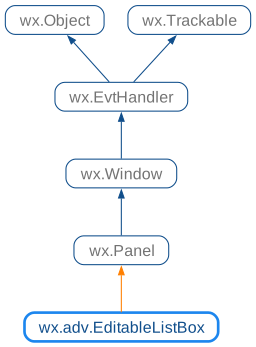
 Class Hierarchy
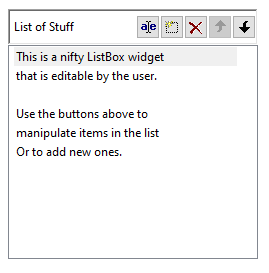
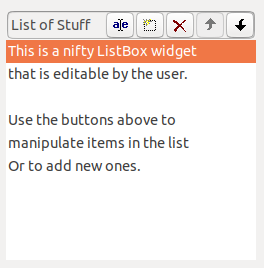
 Control Appearance

 Methods Summary
Default constructor. |
|
Creates the editable listbox for two-step construction. |
|
Returns the button used to delete the selected item from the list. |
|
Returns the button used to move the selected item down in the list. |
|
Returns the button used to edit the label of the selected item. |
|
Returns the internal list control used by the editable list box. |
|
Returns the button used to add a new item to the list. |
|
Returns a list of the current contents of the control. |
|
Returns the button used to move the selected item up in the list. |
|
Replaces current contents with given strings. |
 Properties Summary
See |
|
See |
|
See |
|
See |
|
See |
|
See |
|
See |
 Class API
- class wx.adv.EditableListBox(Panel)
Possible constructors:
EditableListBox() -> None

EditableListBox(parent, id=ID_ANY, label='', pos=DefaultPosition,
                size=DefaultSize, style=EL_DEFAULT_STYLE, name=EditableListBoxNameStr)
                -> None
An editable listbox is composite control that lets the user easily enter, delete and reorder a list of strings.
Methods
- __init__(self, *args, **kw)
 Overloaded Implementations:
__init__ (self)
Default constructor.
- Return type:
None
__init__ (self, parent, id=ID_ANY, label=’’, pos=DefaultPosition, size=DefaultSize, style=EL_DEFAULT_STYLE, name=EditableListBoxNameStr)
Constructor, creating and showing a list box.
- Parameters:
parent (wx.Window) – Parent window. Must not be nullptr.
id (wx.WindowID) – Window identifier. The value
wx.ID_ANYindicates a default value.label (string) – The text shown just before the list control.
pos (wx.Point) – Window position. If
wx.DefaultPositionis specified then a default position is chosen.size (wx.Size) – Window size. If
wx.DefaultSizeis specified then the window is sized appropriately.style (long) – Window style. See wx.adv.EditableListBox.
name (string) – Window name.
- Return type:
None
See also
- Create(self, parent, id=ID_ANY, label='', pos=DefaultPosition, size=DefaultSize, style=EL_DEFAULT_STYLE, name=EditableListBoxNameStr)
Creates the editable listbox for two-step construction.
See wx.adv.EditableListBox for further details.
- static GetClassDefaultAttributes(variant=WINDOW_VARIANT_NORMAL)
- Parameters:
variant (WindowVariant)
- Return type:
VisualAttributes
- GetDelButton(self, *args, **kw)
- Overloaded Implementations:
GetDelButton (self)
Returns the button used to delete the selected item from the list.
Can be used for granular customization, such as changing the icon via SetBitmapLabel().
- Return type:
BitmapButton
GetDelButton (self)
Returns a reference to the delete button used in the EditableListBox.
- Return type:
BitmapButton
- GetDownButton(self, *args, **kw)
- Overloaded Implementations:
GetDownButton (self)
Returns the button used to move the selected item down in the list.
Can be used for granular customization, such as changing the icon via SetBitmapLabel().
- Return type:
BitmapButton
GetDownButton (self)
Returns a reference to the down button used in the EditableListBox.
- Return type:
BitmapButton
- GetEditButton(self, *args, **kw)
- Overloaded Implementations:
GetEditButton (self)
Returns the button used to edit the label of the selected item.
Can be used for granular customization, such as changing the icon via SetBitmapLabel().
- Return type:
BitmapButton
GetEditButton (self)
Returns a reference to the edit button used in the EditableListBox.
- Return type:
BitmapButton
- GetListCtrl(self, *args, **kw)
- Overloaded Implementations:
GetListCtrl (self)
Returns the internal list control used by the editable list box.
While contents should ideally be managed via
SetStrings, this allows for cosmetic customization of the list display.- Return type:
GetListCtrl (self)
Returns a reference to the listctrl used in the EditableListBox.
- Return type:
- GetNewButton(self, *args, **kw)
- Overloaded Implementations:
GetNewButton (self)
Returns the button used to add a new item to the list.
Can be used for granular customization, such as changing the icon via SetBitmapLabel().
- Return type:
BitmapButton
GetNewButton (self)
Returns a reference to the new button used in the EditableListBox.
- Return type:
BitmapButton
- GetStrings(self)
Returns a list of the current contents of the control.
- Return type:
List[str]
- GetUpButton(self, *args, **kw)
- Overloaded Implementations:
GetUpButton (self)
Returns the button used to move the selected item up in the list.
Can be used for granular customization, such as changing the icon via SetBitmapLabel().
- Return type:
BitmapButton
GetUpButton (self)
Returns a reference to the up button used in the EditableListBox.
- Return type:
BitmapButton
- SetStrings(self, strings)
Replaces current contents with given strings.
- Parameters:
strings (list of strings)
- Return type:
None
Properties
- DelButton
See
GetDelButton
- DownButton
See
GetDownButton
- EditButton
See
GetEditButton
- ListCtrl
See
GetListCtrl
- NewButton
See
GetNewButton
- Strings
See
GetStringsandSetStrings
- UpButton
See
GetUpButton