
 wx.aui.AuiMDIParentFrame
wx.aui.AuiMDIParentFrame is an MDI parent frame using wx.aui.AuiNotebook for showing the child frames as notebook pages.
Unlike wx.MDIParentFrame, which uses the native MDI implementation under wxMSW and different implementations under other ports, this class always uses wx.aui.AuiMDIClientWindow as its client window and so always presents its children using AUI tabs. This can be useful for applications wanting the same tabbed MDI appearance on all platforms.
Child windows are created as wx.aui.AuiMDIChildFrame objects using this frame as their parent. The active child receives menu and update UI events before the parent frame handles them.
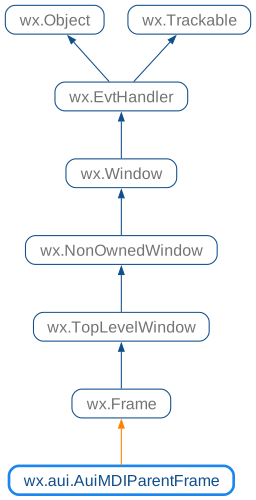
 Class Hierarchy
 Control Appearance


 Methods Summary
Default constructor. |
|
Activates the child following the current one. |
|
Activates the child preceding the current one. |
|
Has no effect for |
|
Has no effect for |
|
Used in two-step frame construction. |
|
Returns the tab art provider used by the underlying wx.aui.AuiNotebook. |
|
Returns the client window containing the child-frame pages. |
|
Returns the notebook used by this frame. |
|
Returns the Window menu used for child-window commands. |
|
Override this to return a custom AuiMDIClientWindow-derived class. |
|
Sets the tab art provider used by the underlying wx.aui.AuiNotebook. |
|
Tells the frame to show the given menu bar. |
|
Replaces the Window menu used for child-window commands. |
|
Splits the active |
 Properties Summary
See |
|
See |
|
See |
|
See |
|
See |
 Class API
- class wx.aui.AuiMDIParentFrame(Frame)
Possible constructors:
AuiMDIParentFrame() -> None

AuiMDIParentFrame(parent, winid=ID_ANY, title='', pos=DefaultPosition,
                  size=DefaultSize, style=DEFAULT_FRAME_STYLE|VSCROLL|HSCROLL,
                  name=FrameNameStr) -> None
AuiMDIParentFrame is an MDI parent frame using AuiNotebook for showing the child frames as notebook pages.
Methods
- __init__(self, *args, **kw)
 Overloaded Implementations:
__init__ (self)
Default constructor.
Use
Createto finish constructing the frame.- Return type:
None
__init__ (self, parent, winid=ID_ANY, title=’’, pos=DefaultPosition, size=DefaultSize, style=DEFAULT_FRAME_STYLE|VSCROLL|HSCROLL, name=FrameNameStr)
Constructor, creating the frame.
The
wx.HSCROLLandwx.VSCROLLstyle bits apply to theAUIMDI client window, not to the frame itself.- Parameters:
- Return type:
None
- ActivateNext(self)
Activates the child following the current one.
- Return type:
None
- ActivatePrevious(self)
Activates the child preceding the current one.
- Return type:
None
- ArrangeIcons(self)
Has no effect for
AUIMDI, because child frames cannot be iconized.- Return type:
None
- Cascade(self)
Has no effect for
AUIMDI, because child frames are notebook pages.- Return type:
None
- Create(self, parent, winid=ID_ANY, title='', pos=DefaultPosition, size=DefaultSize, style=DEFAULT_FRAME_STYLE | VSCROLL | HSCROLL, name=FrameNameStr)
Used in two-step frame construction.
See wx.aui.AuiMDIParentFrame for the parameter descriptions.
- GetActiveChild(self)
- Return type:
- GetArtProvider(self)
Returns the tab art provider used by the underlying wx.aui.AuiNotebook.
- Return type:
- static GetClassDefaultAttributes(variant=WINDOW_VARIANT_NORMAL)
- Parameters:
variant (WindowVariant)
- Return type:
VisualAttributes
- GetClientWindow(self)
Returns the client window containing the child-frame pages.
- Return type:
- GetNotebook(self)
Returns the notebook used by this frame.
- Return type:
- GetWindowMenu(self)
Returns the Window menu used for child-window commands.
- Return type:
Menu
- OnCreateClient(self)
Override this to return a custom AuiMDIClientWindow-derived class.
If you override this function, create the frame using the default constructor followed by
Create, otherwise the overridden virtual function cannot be called during construction.- Return type:
- SetActiveChild(self, pChildFrame)
- Parameters:
pChildFrame (wx.aui.AuiMDIChildFrame)
- Return type:
None
- SetArtProvider(self, provider)
Sets the tab art provider used by the underlying wx.aui.AuiNotebook.
- Parameters:
provider (wx.aui.AuiTabArt)
- Return type:
None
- SetChildMenuBar(self, pChild)
- Parameters:
pChild (wx.aui.AuiMDIChildFrame)
- Return type:
None
- SetMenuBar(self, menuBar)
Tells the frame to show the given menu bar.
- Parameters:
menuBar (wx.MenuBar) – The menu bar to associate with the frame.
- Return type:
None
Note
If the frame is destroyed, the menu bar and its menus will be destroyed also, so do not delete the menu bar explicitly (except by resetting the frame’s menu bar to another frame or nullptr). Under Windows, a size event is generated, so be sure to initialize data members properly before calling
SetMenuBar. Note that on some platforms, it is not possible to call this function twice for the same frame object.See also
- SetWindowMenu(self, pMenu)
Replaces the Window menu used for child-window commands.
- Parameters:
pMenu (wx.Menu)
- Return type:
None
- Tile(self, orient=HORIZONTAL)
Splits the active
AUInotebook page horizontally or vertically.- Parameters:
orient (Orientation)
- Return type:
None
Properties
- ActiveChild
See
GetActiveChildandSetActiveChild
- ArtProvider
See
GetArtProviderandSetArtProvider
- ClientWindow
See
GetClientWindow
- Notebook
See
GetNotebook
- WindowMenu
See
GetWindowMenuandSetWindowMenu